> ## Documentation Index
> Fetch the complete documentation index at: https://docs.ravan.ai/llms.txt
> Use this file to discover all available pages before exploring further.
# Billing
> Manage your subscription plan, purchase credits, monitor usage costs, and access billing history.
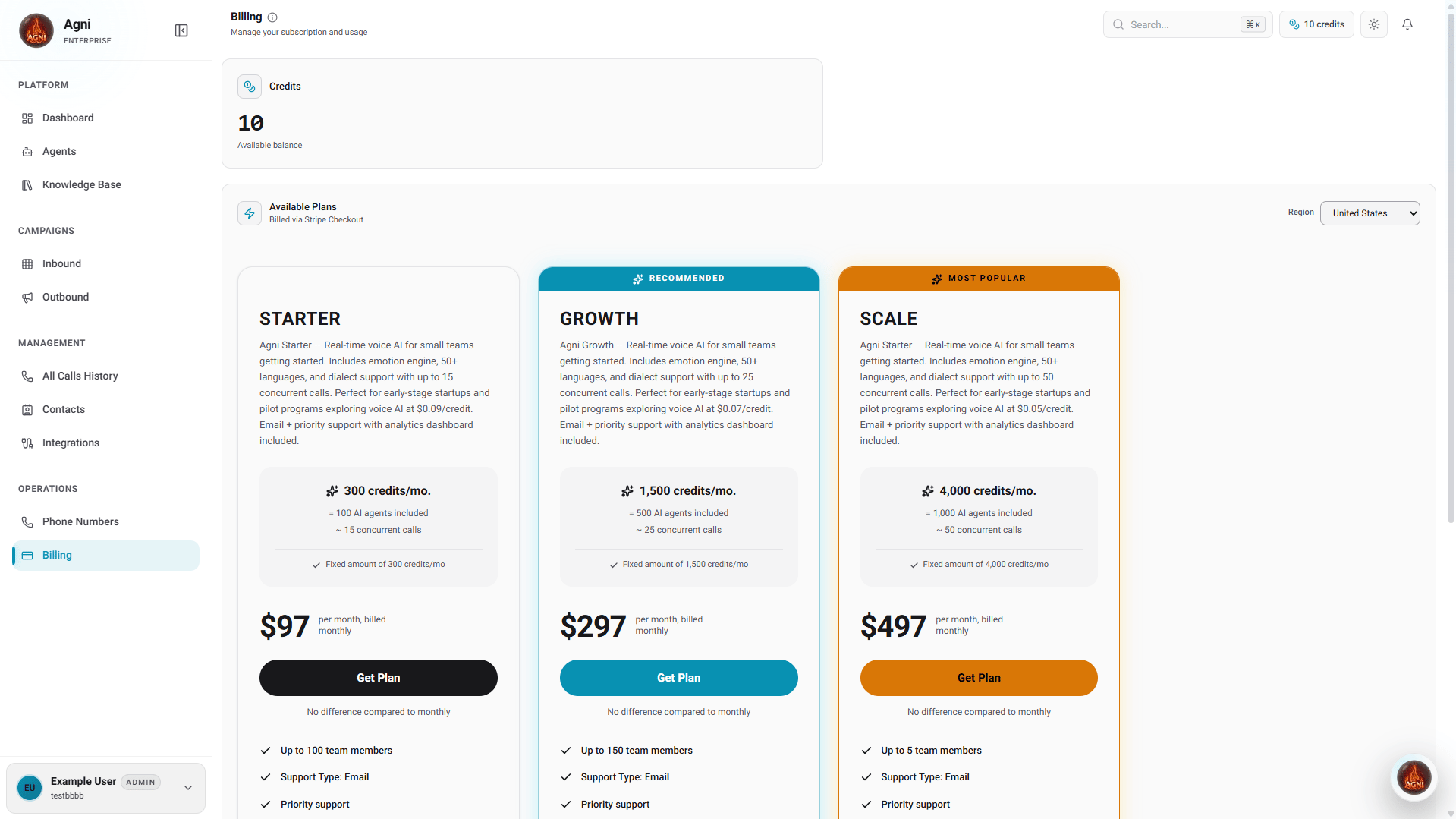
The **Billing** page is where you manage the financial aspects of your Agni workspace. Agni operates on a hybrid model: you must first select a baseline monthly subscription plan, which then unlocks the ability to purchase prepaid credits for your usage.
 ***
## Subscriptions & Plans
Agni offers dynamic subscription tiers based on your selected region. All subscriptions are processed securely via Stripe. Choose the plan that best fits your concurrency and volume needs.
All plans include the emotion engine, 50+ languages, dialect support, API access, email support, priority support, and the analytics dashboard.
**\$97 per month**
Perfect for early-stage startups and pilot programs exploring voice AI.
* Up to **15 concurrent calls**
* **\$0.09** per credit
**\$297 per month**
Ideal for growing teams scaling their real-time voice infrastructure.
* Up to **25 concurrent calls**
* **\$0.07** per credit
**\$497 per month**
Built for high-volume operations requiring maximum throughput.
* Up to **50 concurrent calls**
* **\$0.05** per credit
***
## Credits & Usage
Because real-time voice AI incurs immediate compute and telephony costs, Agni uses a prepaid credit system for call volume. Your agents consume these credits dynamically as they handle live calls.
**Important:** You must have an active subscription plan (Starter, Growth, or Scale) before you can purchase usage credits.
Displays your organization's current, real-time credit balance at the top of the page. Keep an eye on this metric to ensure your agents stay online.
Once subscribed, click this button to top up your account. Adding funds takes only a few seconds and applies to your workspace instantly.
If your credit balance reaches zero, your agents will be temporarily paused and active dispatch rules will fail to connect. Ensure you maintain a positive balance to avoid service interruptions.
***
## Billing History
At the bottom of the page, the **Billing History** table provides a transparent ledger of your past transactions.
Whether you are purchasing prepaid credits or paying for your monthly subscription plan, your official invoices and receipts will automatically populate in this table. You can download them at any time for your accounting and tax records.
***
## Cost Optimization Tips
In your agent's [Call Settings](/guides/agents), set a **Max duration** to prevent runaway calls from consuming excessive credits. 30 minutes is a good hard limit for most use cases.
Turn on **End call after silence** in your agent settings to automatically disconnect calls where the caller has gone silent, avoiding wasted credits.
Check the [Analytics dashboard](/guides/analytics) regularly. Watch for unexpected spikes in call volume or duration that could indicate prompt issues or campaign misconfiguration.
Not every use case needs the most powerful model. For simple routing or FAQ agents, Thunder Emotion Lite performs exceptionally well at a lower computational cost.
***
## Subscriptions & Plans
Agni offers dynamic subscription tiers based on your selected region. All subscriptions are processed securely via Stripe. Choose the plan that best fits your concurrency and volume needs.
All plans include the emotion engine, 50+ languages, dialect support, API access, email support, priority support, and the analytics dashboard.
**\$97 per month**
Perfect for early-stage startups and pilot programs exploring voice AI.
* Up to **15 concurrent calls**
* **\$0.09** per credit
**\$297 per month**
Ideal for growing teams scaling their real-time voice infrastructure.
* Up to **25 concurrent calls**
* **\$0.07** per credit
**\$497 per month**
Built for high-volume operations requiring maximum throughput.
* Up to **50 concurrent calls**
* **\$0.05** per credit
***
## Credits & Usage
Because real-time voice AI incurs immediate compute and telephony costs, Agni uses a prepaid credit system for call volume. Your agents consume these credits dynamically as they handle live calls.
**Important:** You must have an active subscription plan (Starter, Growth, or Scale) before you can purchase usage credits.
Displays your organization's current, real-time credit balance at the top of the page. Keep an eye on this metric to ensure your agents stay online.
Once subscribed, click this button to top up your account. Adding funds takes only a few seconds and applies to your workspace instantly.
If your credit balance reaches zero, your agents will be temporarily paused and active dispatch rules will fail to connect. Ensure you maintain a positive balance to avoid service interruptions.
***
## Billing History
At the bottom of the page, the **Billing History** table provides a transparent ledger of your past transactions.
Whether you are purchasing prepaid credits or paying for your monthly subscription plan, your official invoices and receipts will automatically populate in this table. You can download them at any time for your accounting and tax records.
***
## Cost Optimization Tips
In your agent's [Call Settings](/guides/agents), set a **Max duration** to prevent runaway calls from consuming excessive credits. 30 minutes is a good hard limit for most use cases.
Turn on **End call after silence** in your agent settings to automatically disconnect calls where the caller has gone silent, avoiding wasted credits.
Check the [Analytics dashboard](/guides/analytics) regularly. Watch for unexpected spikes in call volume or duration that could indicate prompt issues or campaign misconfiguration.
Not every use case needs the most powerful model. For simple routing or FAQ agents, Thunder Emotion Lite performs exceptionally well at a lower computational cost.