> ## Documentation Index
> Fetch the complete documentation index at: https://docs.ravan.ai/llms.txt
> Use this file to discover all available pages before exploring further.
# Tools & Functions
> Equip your AI agents with real-world capabilities—end calls, transfer to humans, navigate IVRs, and call external APIs during live conversations.
The **Functions** section inside the Agent Builder is where you define the specific actions your AI agents can perform during a live call. By attaching functions, you upgrade your agent from a conversational assistant to an active participant capable of executing real-world tasks.
To add a function to your agent, open the **Functions** dropdown in the right sidebar of the Agent Builder and click **+ Add Function**.
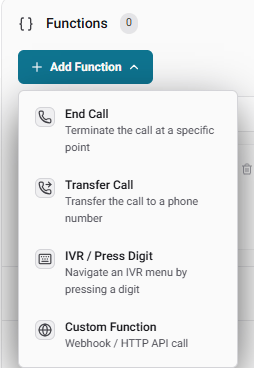 We provide four primary types of functions:
***
## 1. End Call
The **End Call** function allows the AI agent to politely and intentionally hang up the phone when a conversation has naturally concluded or a specific objective has been met.
We provide four primary types of functions:
***
## 1. End Call
The **End Call** function allows the AI agent to politely and intentionally hang up the phone when a conversation has naturally concluded or a specific objective has been met.
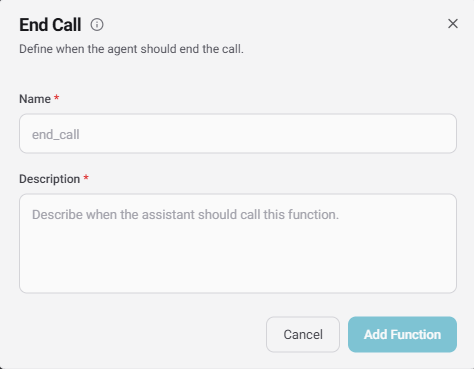 **Configuration Fields:**
* **Name:** The internal identifier for the function (e.g., `end_call`).
* **Description:** A natural-language instruction telling the AI exactly when it should trigger this function (e.g., *"End the call after the user's appointment time is confirmed."*).
***
## 2. Transfer Call
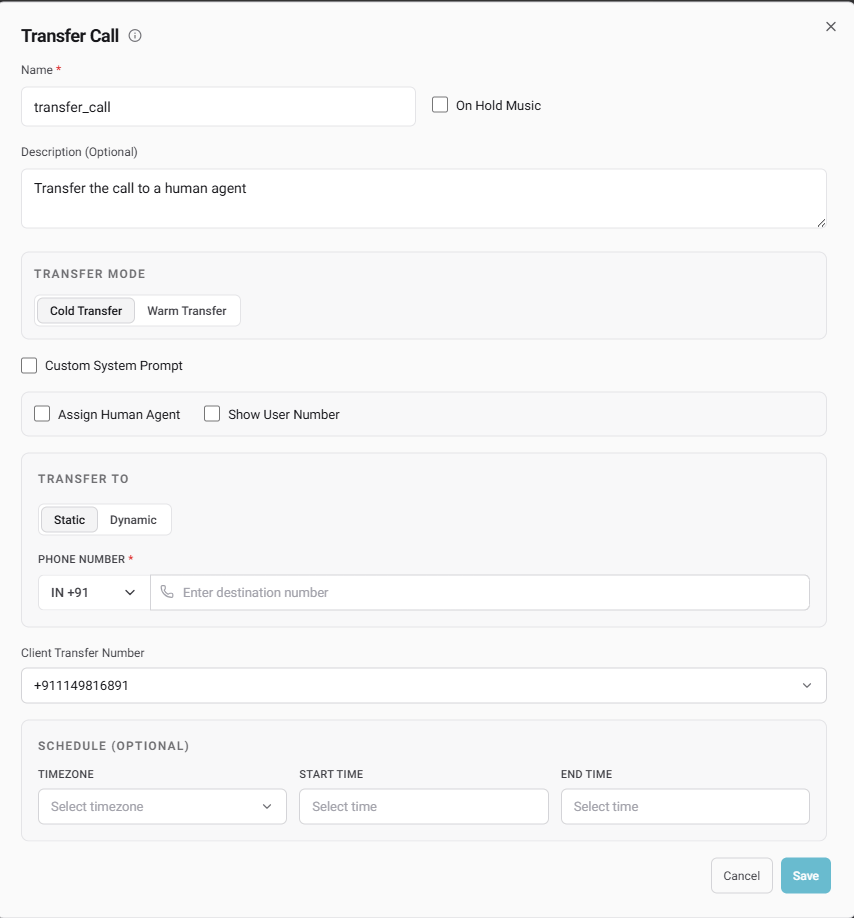
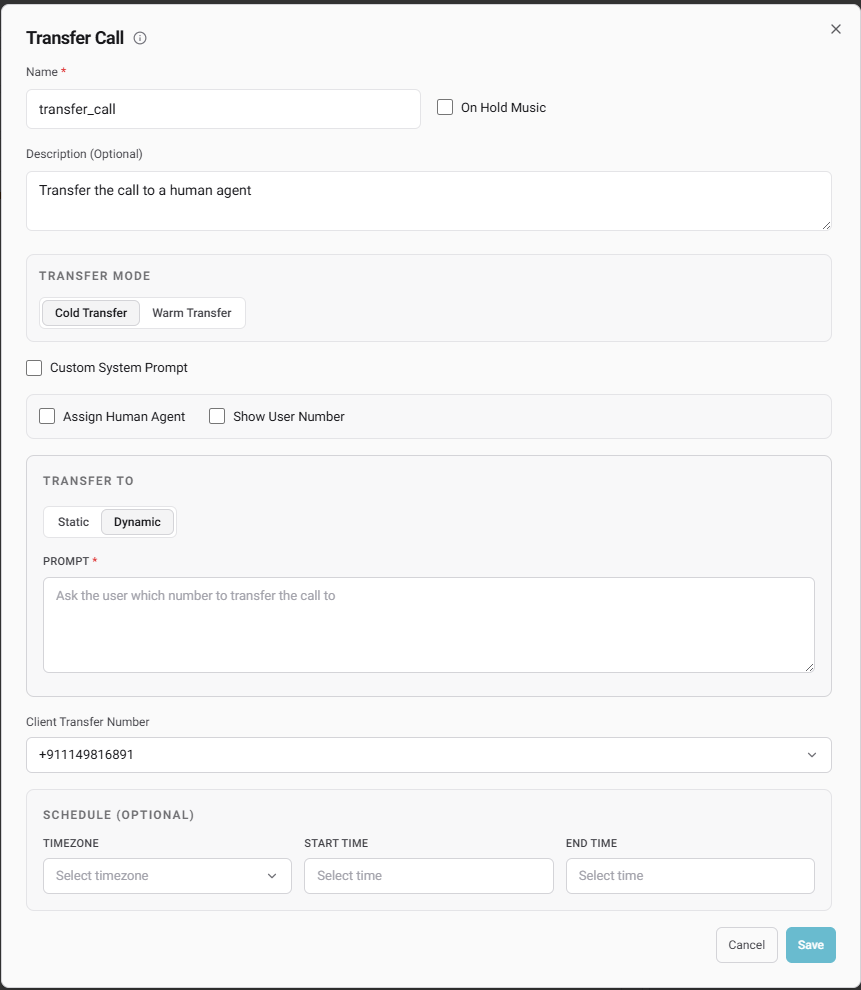
The **Transfer Call** function allows the AI to seamlessly route an active caller to a different destination. We offer three different ways an agent can transfer a call:
### Static vs. Dynamic Transfers
* **Static:** Routes the caller to a single, predefined phone number.
* **Dynamic:** Allows you to provide a prompt instructing the LLM to choose between multiple numbers based on the user's input (e.g., *"Ask the user which department they want, then transfer the call to the corresponding number."*).
**Configuration Fields:**
* **Name:** The internal identifier for the function (e.g., `end_call`).
* **Description:** A natural-language instruction telling the AI exactly when it should trigger this function (e.g., *"End the call after the user's appointment time is confirmed."*).
***
## 2. Transfer Call
The **Transfer Call** function allows the AI to seamlessly route an active caller to a different destination. We offer three different ways an agent can transfer a call:
### Static vs. Dynamic Transfers
* **Static:** Routes the caller to a single, predefined phone number.
* **Dynamic:** Allows you to provide a prompt instructing the LLM to choose between multiple numbers based on the user's input (e.g., *"Ask the user which department they want, then transfer the call to the corresponding number."*).
 ### Assign Human Agent (GoHighLevel Integration)
This powerful feature allows you to transfer calls directly to members of your GoHighLevel (GHL) team.
### Scheduling (Optional)
You can apply strict operating hours to your transfer functions. By selecting a **Timezone**, **Start Time**, and **End Time**, you ensure the call transfer will only execute if the call occurs within the specified window.
### Assign Human Agent (GoHighLevel Integration)
This powerful feature allows you to transfer calls directly to members of your GoHighLevel (GHL) team.
### Scheduling (Optional)
You can apply strict operating hours to your transfer functions. By selecting a **Timezone**, **Start Time**, and **End Time**, you ensure the call transfer will only execute if the call occurs within the specified window.
 ***
## 3. IVR / Press Digit
The **IVR / Press Digit** function empowers your agent to navigate automated phone menus (like pressing '1' for Support or '2' for Sales).
***
## 3. IVR / Press Digit
The **IVR / Press Digit** function empowers your agent to navigate automated phone menus (like pressing '1' for Support or '2' for Sales).
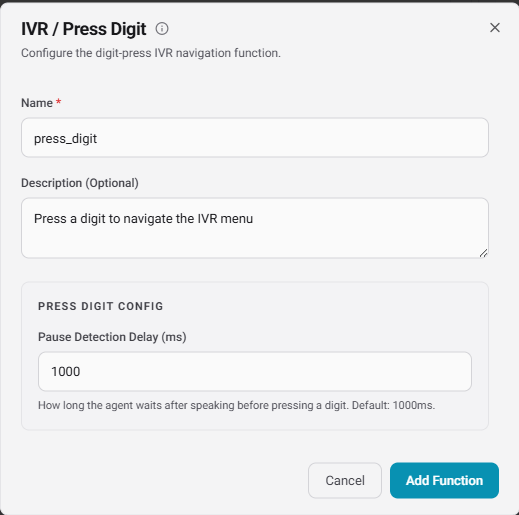 * **Pause Detection Delay (ms):** Controls exactly how long the agent waits in silence after speaking before it presses the required digit. The default is **1000ms**, giving the receiving system time to register the input.
***
## 4. Custom Functions
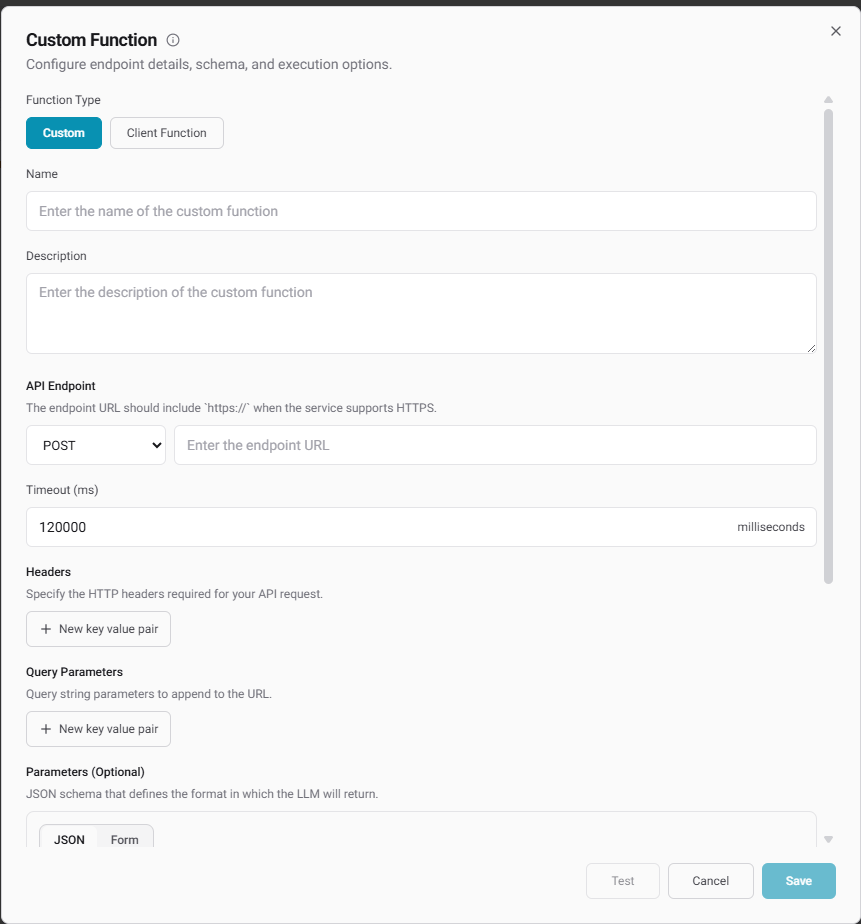
Custom functions let you integrate your agent directly with your own application ecosystem. We support two execution types:
* **Pause Detection Delay (ms):** Controls exactly how long the agent waits in silence after speaking before it presses the required digit. The default is **1000ms**, giving the receiving system time to register the input.
***
## 4. Custom Functions
Custom functions let you integrate your agent directly with your own application ecosystem. We support two execution types:
 ### Custom (Server-Side API)
Configure a direct HTTP webhook call that the agent triggers mid-conversation.
* **API Endpoint:** Define the HTTP method (GET, POST, PUT, PATCH, DELETE) and your secure `https://` URL.
* **Timeout (ms):** Set maximum execution limits to prevent the agent from stalling.
* **Headers & Query Parameters:** Pass required authorization keys or specific identifiers.
* **Parameters (JSON Schema):** Define the strict JSON payload format the LLM must generate to fulfill the API request.
### Client Function
Execute functions strictly on the client side. Simply provide a **Name**, a **Description** of what the tool does, and an optional **JSON Schema** defining the parameters the LLM will pass directly to your client application.
***
## Extended Agent Capabilities
Beyond tools, the Agent Builder sidebar includes several dedicated panels to refine how your agent operates and connects with external data:
### Calendars & Human Agents
* **Calendars:** Link your agent to **Lead Connector (GoHighLevel)** or **Cal.com** so it can autonomously negotiate times and book appointments.
* **Assign Human Agent:** Quickly bind specific GHL users (configured via the "My Staff" step above) directly to the agent's workflow.
### Knowledge Base
Attach a custom dataset to your agent. This grants the AI access to your company’s specific documents, ensuring it knows your product details intimately and can answer questions without hallucinating.
### Speech Settings
Control the exact auditory experience of the call:
* **Background Sound:** Layer in realistic ambient noise, choosing from *Office, City, Forest, Crowded, Keyboard,* or *Hold* music.
* **Interruption Sensitivity:** Adjust how easily the caller can talk over the agent (e.g., `0.9`).
* **Reminder Message Frequency:** Define how many seconds of dead air should pass, and how many times the AI should attempt to re-engage, before speaking a custom **Reminder Message**.
### Call Settings & Memory
* **Telephony Rules:** Toggle **Voicemail detection**, set **Silence timeouts** (e.g., 10s), enforce a hard **Max duration** limit (e.g., 30 min) to control costs, and configure **Emergency fallback** to transfer the call to a backup number on failure.
* **Memory:** When enabled, the agent remembers specific details about users across both inbound and outbound calls. For example, if a caller provided their name in a previous interaction, the agent can access that context and greet them personally ("Hey Aryan, how are you?") on the next call.
### Post-Call Data Extraction
Automatically synthesize data the moment the call disconnects. You can configure the LLM to analyze **Sentiments** (Negative, Positive, Neutral) or draft a detailed **Summary** of the conversation to pass along to your CRM or a human agent.
### Custom (Server-Side API)
Configure a direct HTTP webhook call that the agent triggers mid-conversation.
* **API Endpoint:** Define the HTTP method (GET, POST, PUT, PATCH, DELETE) and your secure `https://` URL.
* **Timeout (ms):** Set maximum execution limits to prevent the agent from stalling.
* **Headers & Query Parameters:** Pass required authorization keys or specific identifiers.
* **Parameters (JSON Schema):** Define the strict JSON payload format the LLM must generate to fulfill the API request.
### Client Function
Execute functions strictly on the client side. Simply provide a **Name**, a **Description** of what the tool does, and an optional **JSON Schema** defining the parameters the LLM will pass directly to your client application.
***
## Extended Agent Capabilities
Beyond tools, the Agent Builder sidebar includes several dedicated panels to refine how your agent operates and connects with external data:
### Calendars & Human Agents
* **Calendars:** Link your agent to **Lead Connector (GoHighLevel)** or **Cal.com** so it can autonomously negotiate times and book appointments.
* **Assign Human Agent:** Quickly bind specific GHL users (configured via the "My Staff" step above) directly to the agent's workflow.
### Knowledge Base
Attach a custom dataset to your agent. This grants the AI access to your company’s specific documents, ensuring it knows your product details intimately and can answer questions without hallucinating.
### Speech Settings
Control the exact auditory experience of the call:
* **Background Sound:** Layer in realistic ambient noise, choosing from *Office, City, Forest, Crowded, Keyboard,* or *Hold* music.
* **Interruption Sensitivity:** Adjust how easily the caller can talk over the agent (e.g., `0.9`).
* **Reminder Message Frequency:** Define how many seconds of dead air should pass, and how many times the AI should attempt to re-engage, before speaking a custom **Reminder Message**.
### Call Settings & Memory
* **Telephony Rules:** Toggle **Voicemail detection**, set **Silence timeouts** (e.g., 10s), enforce a hard **Max duration** limit (e.g., 30 min) to control costs, and configure **Emergency fallback** to transfer the call to a backup number on failure.
* **Memory:** When enabled, the agent remembers specific details about users across both inbound and outbound calls. For example, if a caller provided their name in a previous interaction, the agent can access that context and greet them personally ("Hey Aryan, how are you?") on the next call.
### Post-Call Data Extraction
Automatically synthesize data the moment the call disconnects. You can configure the LLM to analyze **Sentiments** (Negative, Positive, Neutral) or draft a detailed **Summary** of the conversation to pass along to your CRM or a human agent.