

Running outbound calls
In the Campaigns section, the Outbound area lets you automate outbound calls at scale — from lead qualification and appointment reminders to customer follow-ups and surveys. Define your audience, assign an agent, and let Agni handle the rest.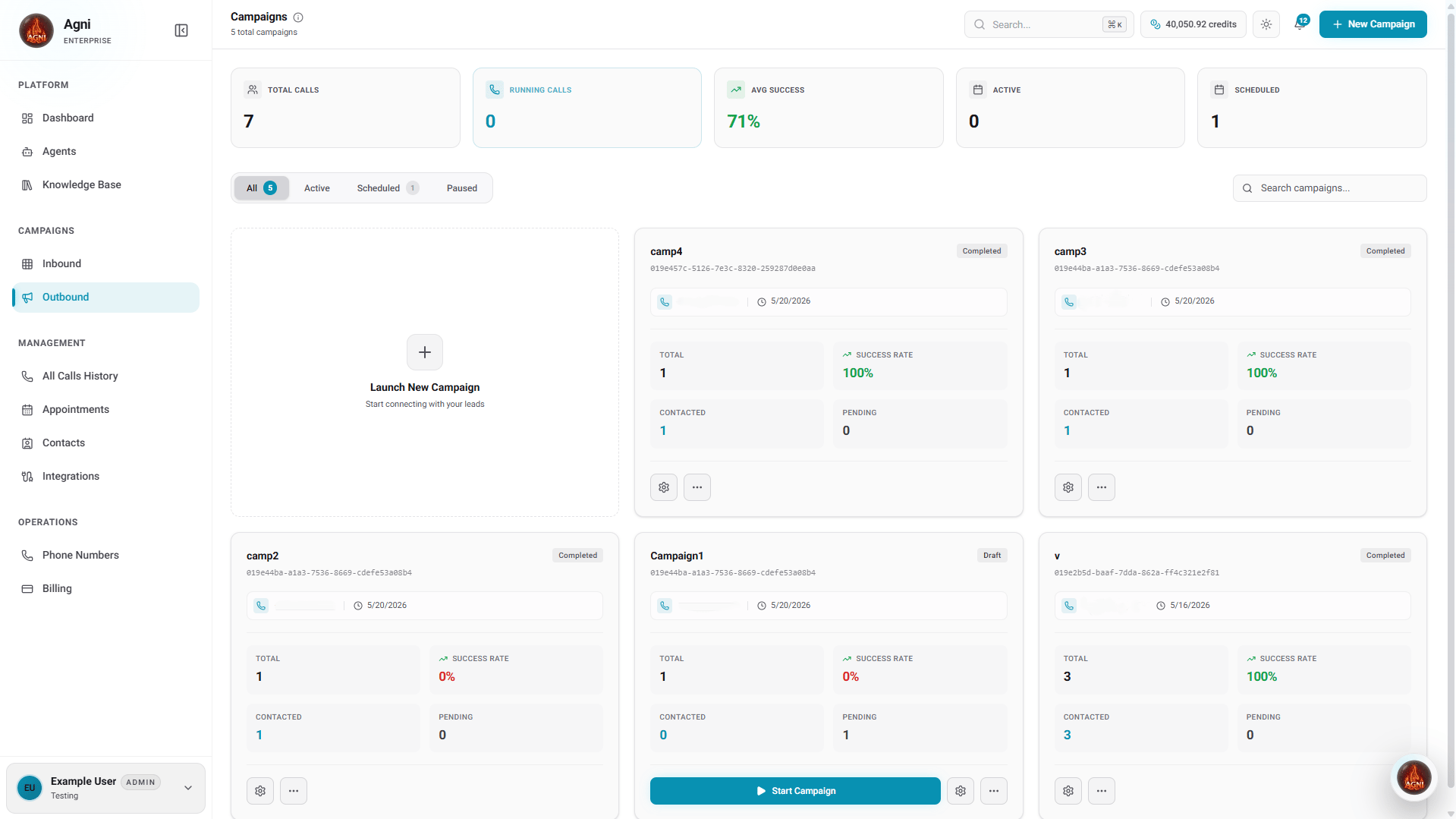
How Campaigns Work
Create a campaign
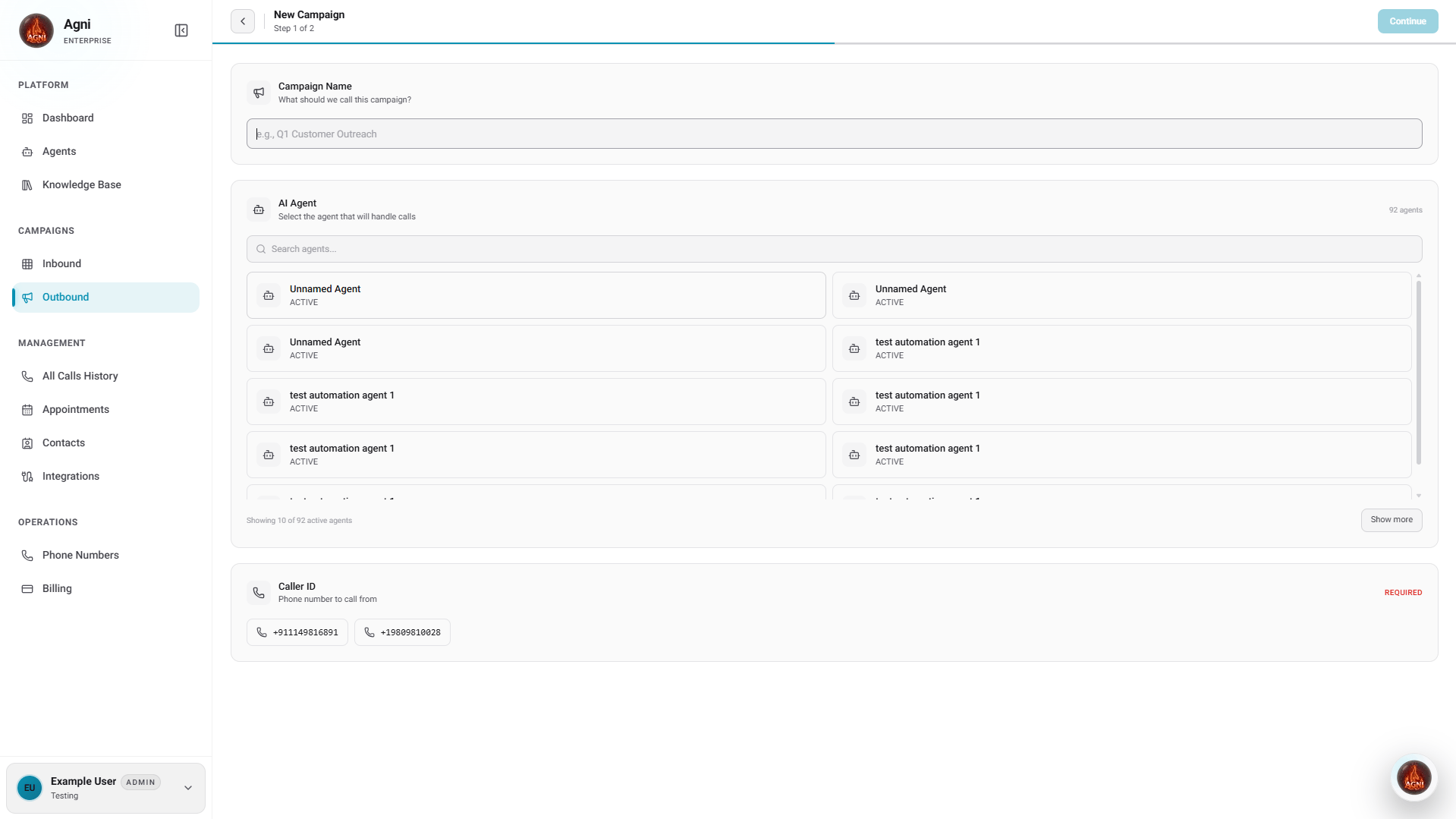
Give your campaign a name, select the AI agent that will handle calls, and choose your Caller ID.
Add contacts & configure settings
Select contacts to call, set your call window (timezone, hours, active days), and configure advanced settings like retries and gap between attempts.
Launch
After creating the campaign, click the Start button on the campaign overview page. Agni dials contacts automatically within your configured call window.
Monitor & optimize
Track completion rates, call outcomes, and campaign progress in real-time from the campaign overview.
Creating a Campaign
Click + New Campaign from the Campaigns page. Campaign creation is a two-step process.Step 1 — Campaign Details
Step 2 — Contacts & Settings
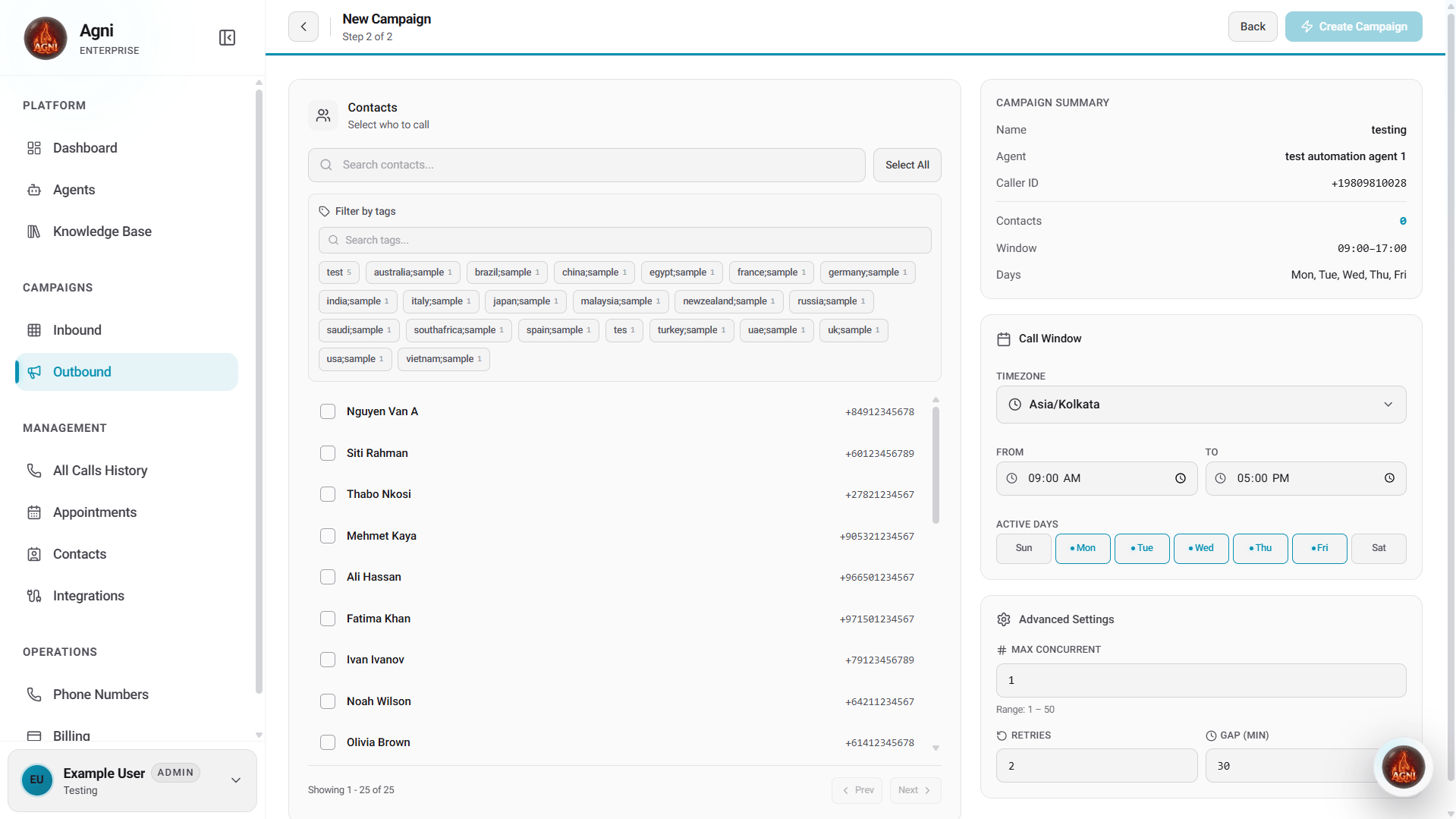
You can also filter by Tags, Status, Last Called, or Added date, and use Select All to include your entire filtered list.
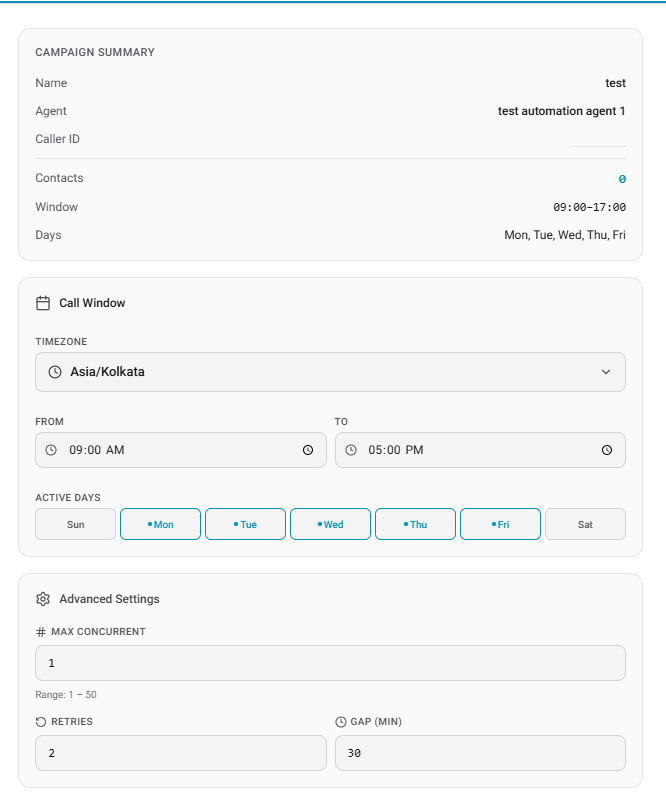
Call Window
Define when Agni is allowed to place calls:
Advanced Settings
Max Concurrent calls are controlled by your plan. Free plans support up to 5 concurrent calls. Upgrade your plan to increase this limit.
Starting a Campaign
After creation, you’ll land on the campaign overview page. The campaign starts in Draft state — no calls are placed yet. Click the Start button (top right) to activate the campaign. Agni will begin dialing contacts within your configured call window. You can pause a running campaign at any time from the campaign card on the Campaigns page or from within the campaign overview.Campaign Overview
Once a campaign is created, clicking into it shows a full overview: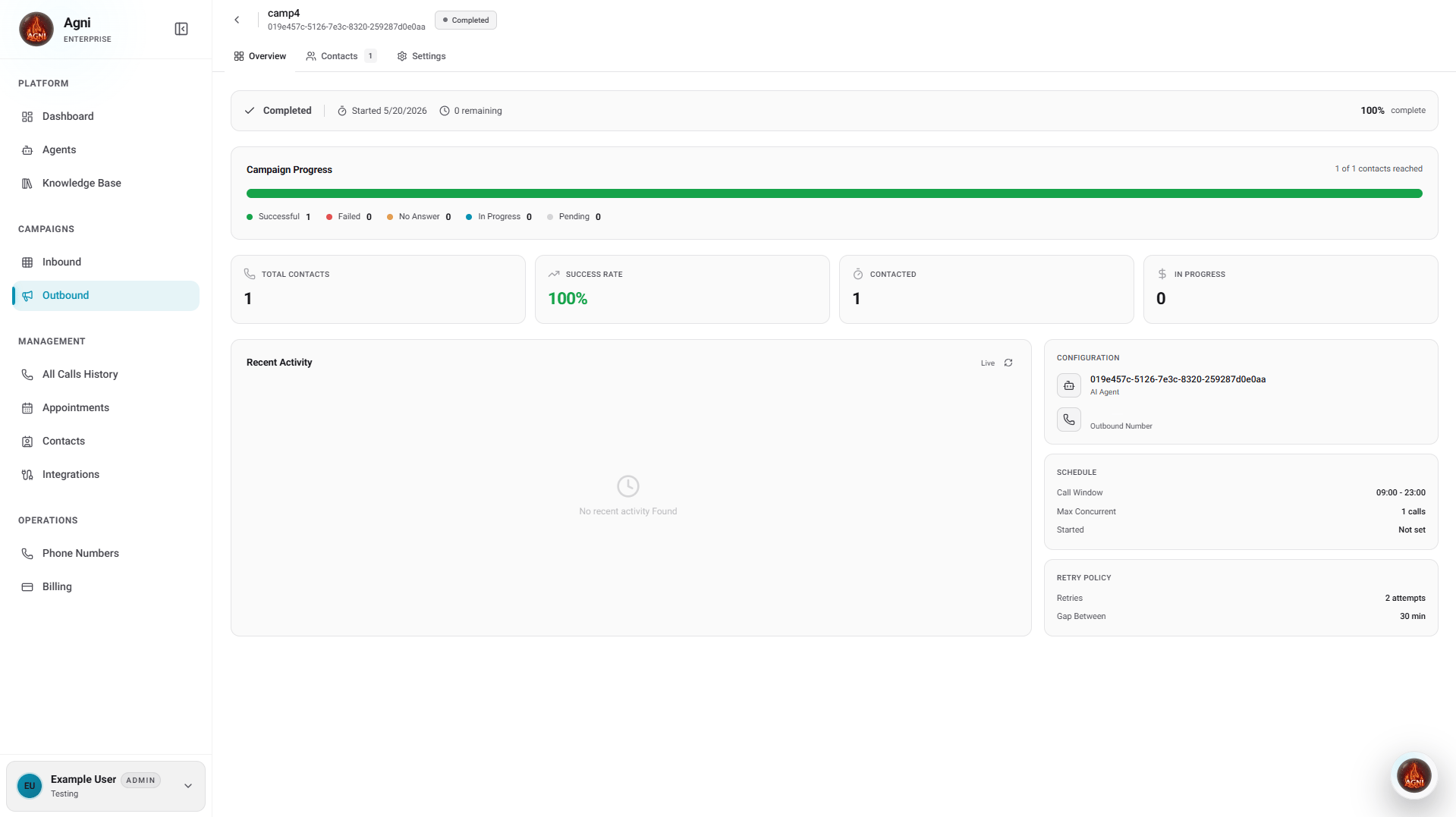
The right panel shows your Configuration (agent, outbound number), Schedule (call window, max concurrent), and Retry Policy (attempts, gap between retries).
Campaigns Dashboard
The main Campaigns page shows all your campaigns and a high-level summary at the top:
Each campaign card displays the agent’s phone number, creation date, total contacts, success rate, contacted count, and pending contacts. Campaigns can be in Active, Paused, Completed, or Scheduled states.
Use the filter tabs (All, Active, Scheduled, Paused) or the search bar to find specific campaigns.
Contact Management
Importing Contacts
Contacts can be added via CSV upload or the API before being assigned to a campaign. Via CSV Upload:Using Contact Data in Calls
Contact fields map to dynamic variables in your agent prompt:Campaign Patterns
Appointment Reminders
Appointment Reminders
Goal: Reduce no-shows by confirming appointments 24 hours ahead.
- Agent prompt: Confirm date/time, offer reschedule option
- Concurrency: 5–10 (high volume, short calls)
- Call window: Business hours, day before appointment
- Retries: 2
- Dynamic variables:
{{patient_name}},{{appointment_date}},{{doctor_name}}
Lead Qualification
Lead Qualification
Goal: Qualify inbound leads before passing to sales.
- Agent prompt: Ask qualifying questions (budget, timeline, decision maker)
- Concurrency: 3–5 (longer conversations)
- Call window: Within 5 minutes of lead submission
- Retries: 3 (over 2 days)
- Post-call analysis: Extract qualification score
Customer Surveys
Customer Surveys
Goal: Collect NPS or satisfaction feedback post-purchase.
- Agent prompt: Ask 3–5 structured questions, thank the customer
- Concurrency: 5–8
- Call window: 2–7 days after purchase
- Retries: 2
- Post-call extraction: Rating (1–10), comments, follow-up needed
Re-engagement
Re-engagement
Goal: Win back churned or inactive customers.
- Agent prompt: Acknowledge absence, offer incentive, address concerns
- Concurrency: 3–5
- Call window: Weekday afternoons (highest answer rate)
- Retries: 2 (avoid being pushy)
- Tone: Warm, no hard sell
Cost Optimization
Start small
Test with 50–100 contacts first. Optimize the prompt and settings before scaling to thousands.
Time it right
Calls between 10am–12pm and 2pm–5pm local time have the highest answer rates. Avoid early mornings and late evenings.
Use retries wisely
2 retries with a 30-minute gap is a solid default. More retries rarely improve reach and increase costs.
Match concurrency to volume
Start at 2–5 concurrent calls and scale up. Free plans are capped at 5 — upgrade for higher throughput.
Compliance
- TCPA (US) — Obtain prior express consent before automated calls. Honor Do Not Call lists.
- GDPR (EU) — Lawful basis required for processing phone numbers. Provide opt-out on every call.
- Local regulations — Check calling hour restrictions in your target regions.
- Caller ID — Always display a valid caller ID number. Spoofing is illegal.