

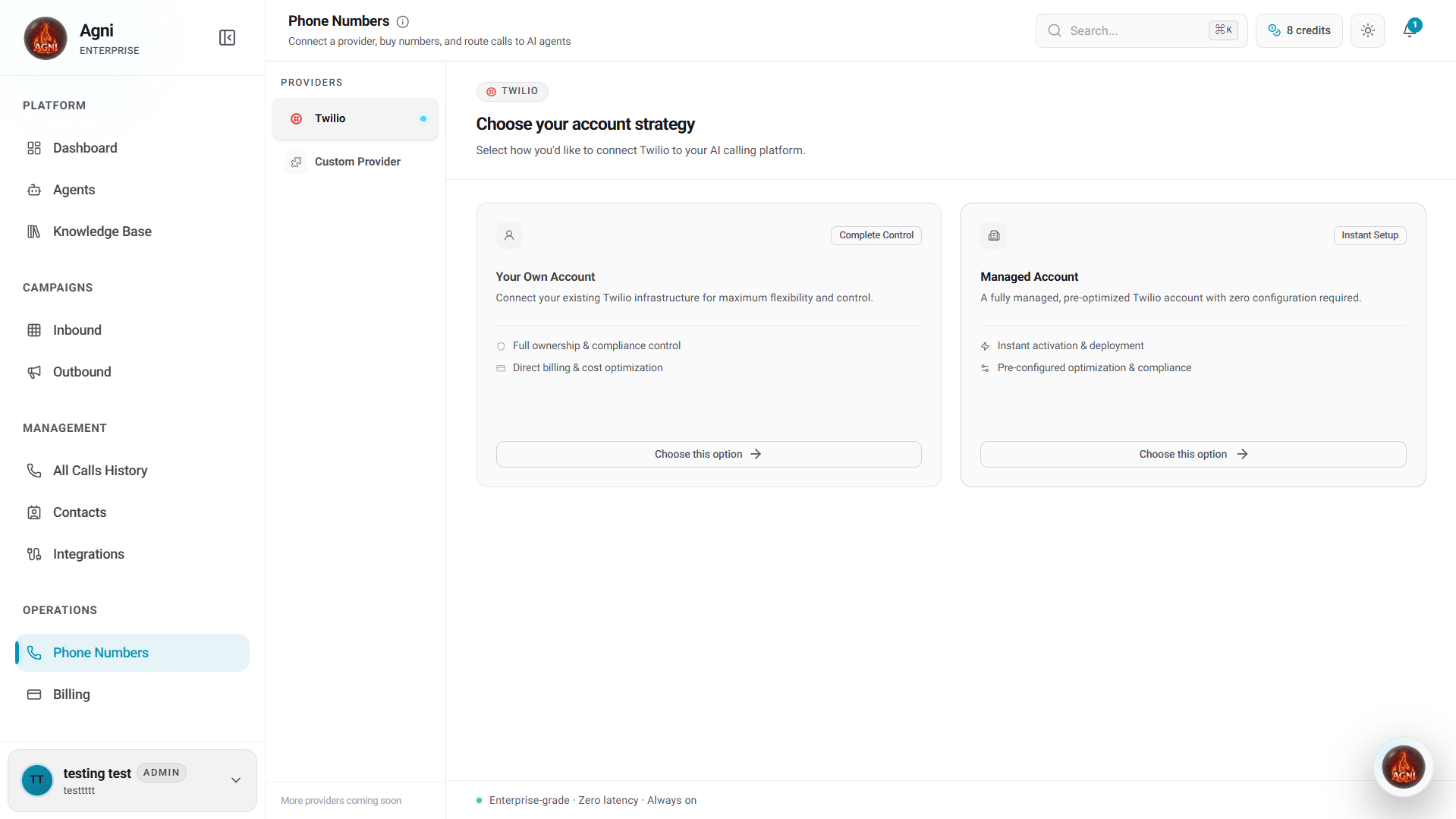
First-Time Setup: Choose Your Strategy
When you access the Phone Numbers tab, you must first choose how you want to connect and manage your telephony infrastructure from the left-hand Providers menu.Option 1: Custom Provider (SIP Integration)
Choose this option if you want to bring your own telephony carrier (BYOC) using SIP trunking. This allows you to route calls from any external provider directly into your Agni agents.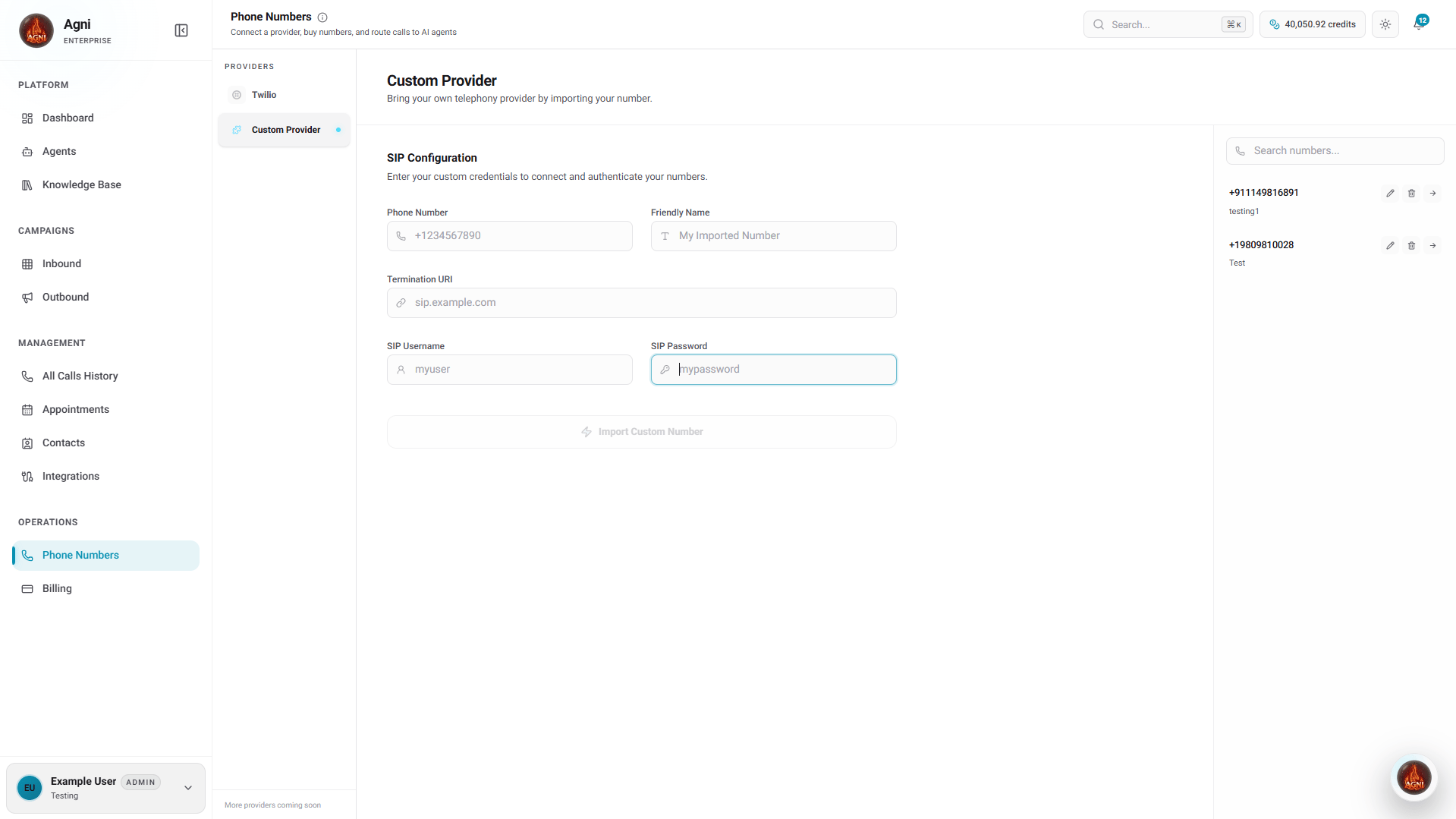
Select Custom Provider
Navigate to the Custom Provider tab under the Providers menu.
Enter Number Details
Input the Phone Number you are importing (including the country code) and assign it a Friendly Name for easy identification within your workspace.
Set Termination URI
To successfully route inbound calls to your Agni agents, configure your external provider to point to Agni’s infrastructure using our dedicated Termination URI:
sip:68uajga988j.sip.livekit.cloudInput this into the Termination URI field.Configure SIP Credentials
Enter your SIP Username and SIP Password to authenticate the connection securely.
Import Number
Click Import Custom Number to finalize the configuration. The number will immediately become available in your active inventory.
Option 2: Twilio - Your Own Account (BYOT)
Choose this option if you already have a Twilio account and want full ownership, compliance control, and direct billing from Twilio.Select Your Own Account
Under the Twilio provider tab, click Choose this option under the “Your Own Account” card.
Confirm Selection
A confirmation modal will appear. Click Continue Setup to lock in your configuration.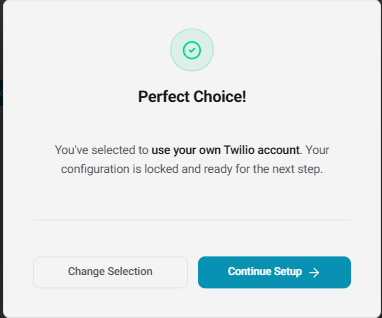
Enter Credentials
Provide a Friendly Name for your integration, along with your Twilio Account SID and Auth Token. These can be found in your Twilio Console. Click Connect Account.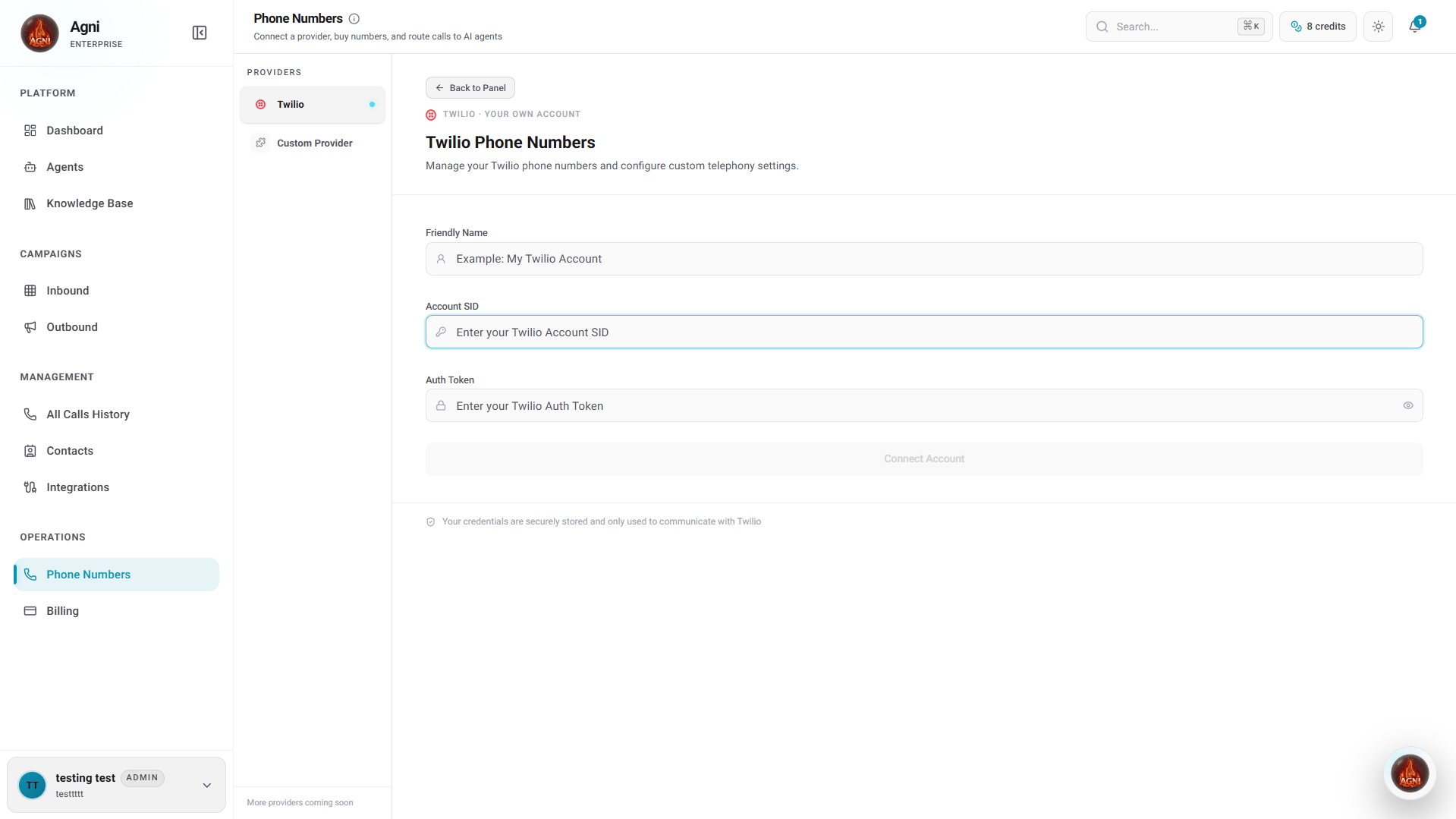
When to choose BYOT: If you need regulatory compliance control, already have Twilio numbers, want to keep telephony billing separate from Agni, or need access to Twilio’s full feature set.
Option 3: Twilio - Managed Account
Choose this option if you want a zero-configuration experience. Agni will manage the underlying infrastructure, and telephony usage will be deducted directly from your Agni credit balance.Select Managed Account
Under the Twilio provider tab, click Choose this option under the “Managed Account” card.
Accept Terms and Conditions
Because Agni handles the billing and compliance for Managed Accounts, you must review and accept the telephony terms.
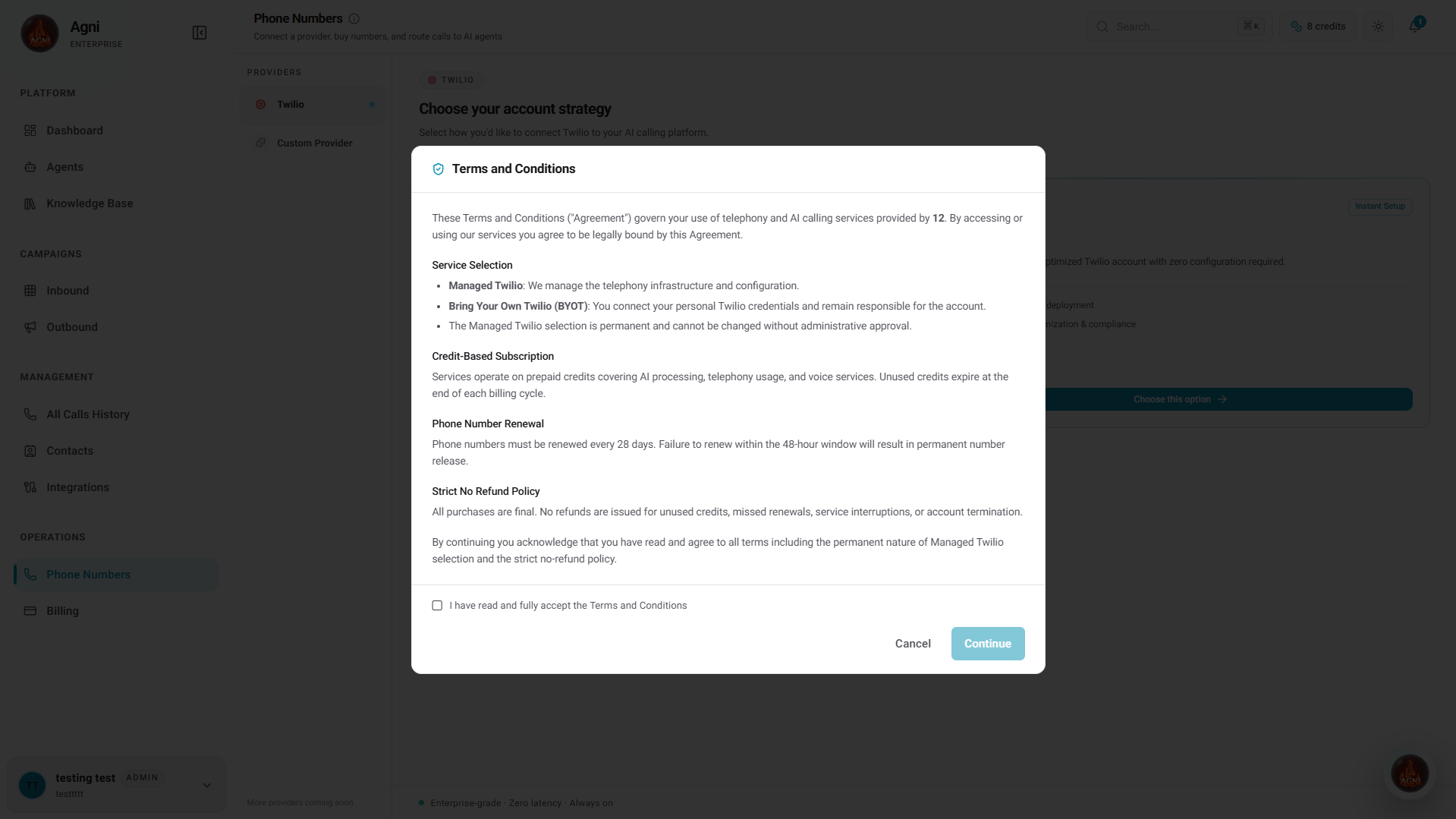
View Terms & Conditions Summary
View Terms & Conditions Summary
- Service Selection: The Managed Twilio selection is permanent and cannot be changed without administrative approval.
- Credit-Based Subscription: Services operate on prepaid credits. Unused credits expire at the end of each billing cycle.
- Phone Number Renewal: Phone numbers must be renewed every 28 days. Failure to renew within the 48-hour window will result in permanent number release.
- Strict No Refund Policy: All purchases are final. No refunds are issued for unused credits, missed renewals, service interruptions, or account termination.
Assign Friendly Name
Give your managed connection a Friendly Name to identify it in your workspace, then click Connect Account to finalize the setup.
When to choose Managed: If you want the fastest setup, don’t have an existing provider, and prefer consolidated billing through Agni.
Option 4: Indian Telephony
Choose this option if you need to provision Indian (+91) phone numbers. You will need to complete a KYC compliance process before you can buy numbers.Select Indian Telephony
Under the Indian Telephony provider tab from the left menu.
Verify mobile number
Verify your mobile number to start the process.
Submit KYC
Complete the KYC (Know Your Customer) compliance process. This is a regulatory requirement for provisioning Indian phone numbers.
Buy Number
Once approved, you can purchase Indian numbers.
- Monthly fee — ₹295/mo.
- Outbound rate — ₹0.60/min.
- Inbound rate — ₹0.60/min.
Managing Phone Numbers
Once your account strategy is configured, you will unlock the main Phone Numbers dashboard.
Buy a New Number (Twilio Only)
If you are using a Twilio integration, use the left panel to search for and purchase new phone numbers directly into your workspace:Select Country
Select your desired Country from the dropdown menu to load available inventory.
Search & Filter
Use the search bar to filter for specific area codes, prefixes, or vanity patterns.
Review Pricing
Review the costs associated with the number:
- Monthly fee — Flat rate for owning the number (e.g., $1.15/mo for US numbers).
- Outbound rate — Per-minute cost for calls your agent makes (e.g., $0.0945/min).
- Inbound rate — Per-minute cost for calls your agent receives (e.g., $0.0085/min).
Purchase
Select a number and click Buy Number to provision it immediately to your workspace.
Owned Numbers
The right panel displays your active inventory, including any numbers you have purchased or imported via a Custom Provider. Any number listed here is immediately ready to be used in your Inbound Calls dispatch rules or as a Caller ID for outbound campaigns.API Reference
Agni’s Telephony API allows you to automate number provisioning and management directly from your backend.List Available Numbers
Search the inventory for numbers available to purchase in any country.
Buy Number
Programmatically purchase a number and add it to your workspace.
List Purchased/Imported Numbers
Retrieve the active inventory of phone numbers connected to your account.
Release Number
Release a phone number or remove a custom provider connection.